Cloud Security Risks Are Increasing
Recent cybersecurity reports show that thousands of new security vulnerabilities are disclosed every year, and many breaches originate from weak credentials, misconfigured cloud services, or insecure integrations.
As organizations extend SAP landscapes to the cloud using SAP Business Technology Platform (SAP BTP), securing identities, APIs, integrations, and sensitive enterprise data becomes critical.
A well-designed SAP BTP security architecture enables organizations to:
- Protect sensitive enterprise data
- Secure APIs and application services
- Ensure regulatory compliance
- Safely integrate cloud applications with on-premise SAP systems
To address these challenges, organizations must adopt a structured security approach when designing and operating SAP BTP environments.
This article outlines seven essential SAP BTP security practices that organizations should implement when building secure cloud applications.
Understanding the Shared Responsibility Model in SAP Cloud
SAP BTP runs on hyperscaler infrastructure such as AWS, Microsoft Azure, and Google Cloud Platform. In cloud environments, security follows a shared responsibility model.
- Cloud providers secure the underlying infrastructure, network, and physical data centers.
- SAP secures the platform services and core cloud components.
- Organizations remain responsible for securing application configurations, identities, integrations, and data.
This means companies using SAP BTP must implement strong identity management, access governance, API security, and monitoring controls to protect their cloud environments.
What is SAP BTP Security?
SAP BTP Security refers to the set of controls, services, and governance mechanisms used to protect applications, identities, APIs, and data within the SAP Business Technology Platform.
It includes capabilities such as:
- Identity and access management integrated with enterprise identity providers such as Microsoft Entra ID, Okta, or SAP Cloud Identity Services (CIS).
- Role-based authorization
- API and application security
- Secure connectivity with on-premise systems
- Encryption and token management
- Monitoring, logging, and audit services
Implementing strong SAP BTP security practices helps organizations protect business data, maintain compliance with industry regulations, and securely extend SAP systems into the cloud.
Key Security Layers in SAP BTP Architecture
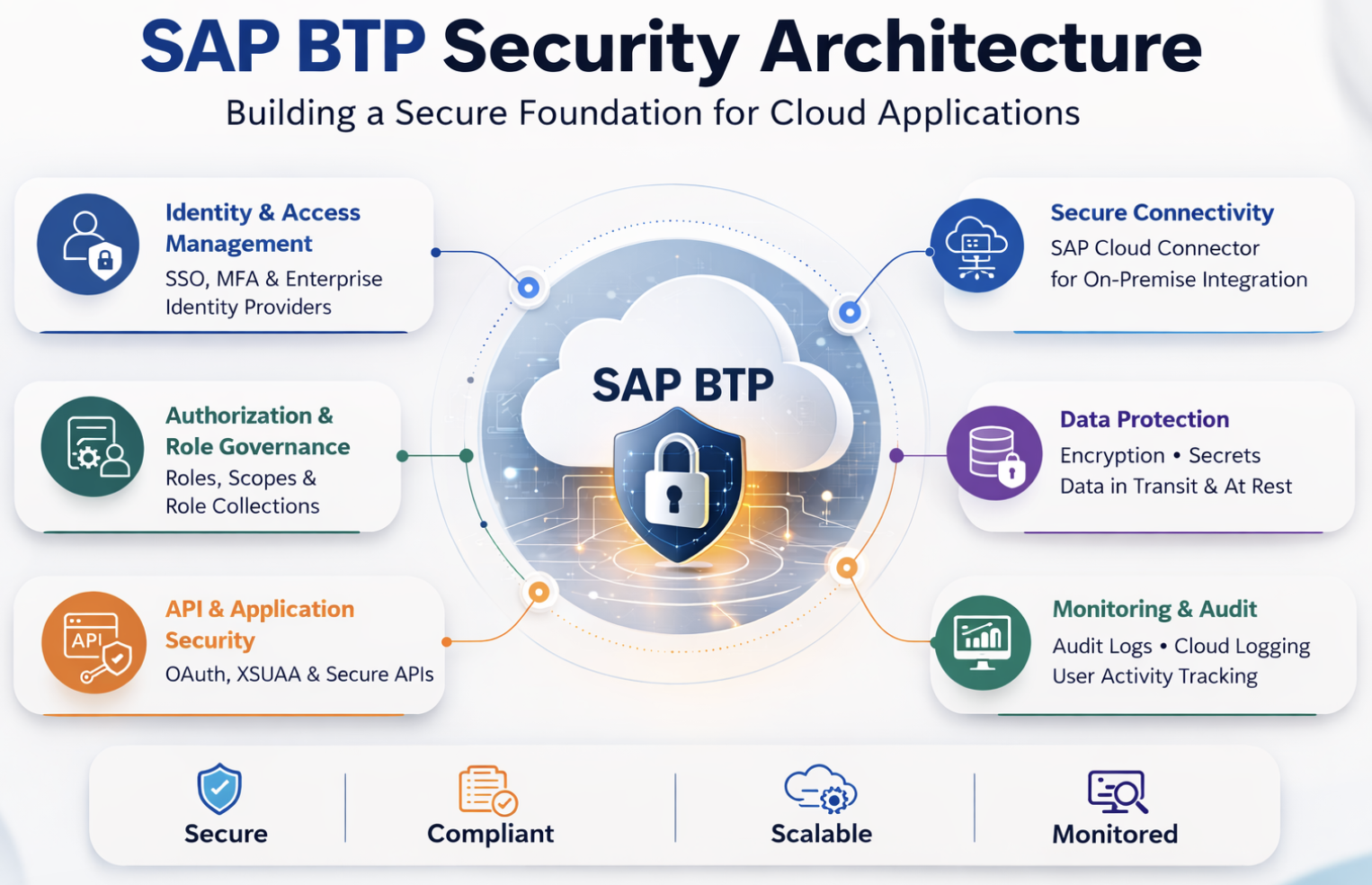
A secure SAP BTP architecture is built on multiple security layers. These layers work together to provide a defense-in-depth security model for cloud applications.
1. Identity and Access Management
Authentication through SSO, Multi-Factor Authentication (MFA), and enterprise identity providers ensures only authorized users can access SAP BTP services.
2. Authorization and Role Governance
Access to services and applications is controlled through roles, scopes, and role collections.
3. API and Application Security
Application access is secured using OAuth tokens, XSUAA authorization services, and secure API endpoints.
4. Secure Connectivity
Integration between cloud and on-premise systems is enabled through SAP Cloud Connector, which avoids direct exposure of internal systems.
5. Data Protection
Sensitive information is protected using encryption for data in transit and at rest along with secure secret management.
6. Monitoring and Audit
Security monitoring services such as Audit Log Service and Cloud Logging provide visibility into user activity and system changes.
Together, these layers ensure that SAP BTP applications follow a robust cloud security architecture.
1. Implement Strong Identity and Authentication Controls
Identity management is the first line of defense in any cloud environment. SAP BTP integrates with enterprise identity providers to manage authentication and user lifecycle across applications and services.
Common identity providers supported by SAP BTP include:
- Microsoft Entra ID
- Okta
- SAP Identity Authentication Service (IAS) – Now part of CIS
Centralized identity management enables organizations to enforce consistent authentication policies and centralized access control.
Best Practices:
- Enable Single Sign-On (SSO) using enterprise identity providers
- Enforce Multi-Factor Authentication (MFA) for administrators and privileged users
- Use SAML 2.0 or OpenID Connect for secure authentication
- Avoid creating local users whenever possible
For example, when SAP BTP integrates with Microsoft Entra ID, user access can be automatically revoked when employees leave the organization, significantly reducing insider risk.
2. Enforce the Principle of Least Privilege
One of the most common security risks in cloud platforms is over-privileged access.
SAP BTP uses roles, scopes, and role collections to control authorization. Applying the Principle of Least Privilege (PoLP) ensures users only receive access required to perform their responsibilities.
Recommended Practices
- Create role collections aligned with job functions and operational responsibilities.
- Assign roles to groups instead of individual users
- Separate developer, operator, and administrator responsibilities
- Conduct periodic access reviews
This approach significantly reduces the risk of unauthorized system changes, privilege misuse, and accidental data exposure.
3. Design a Secure SAP BTP Account Structure
SAP BTP environments follow a hierarchical model:
Global Account → Directories → Subaccounts
Proper governance of this structure is essential for maintaining security and operational control.
Security Recommendations
- Restrict Global Account administrator access to a small group of trusted administrators.
- Use directories to organize development, testing, and production environments
- Monitor service entitlements and resource consumption
- Implement governance policies for service provisioning
Separating development and production environments ensures that changes in development systems cannot impact critical business applications.
4. Secure APIs and Application Services
Modern SAP BTP applications rely heavily on APIs, microservices, and external integrations. If APIs are not properly secured, they can become major entry points for cyber-attacks.
In addition to OAuth authentication, organizations should route API traffic through SAP API Management or SAP Destination Service. These services provide centralized policy enforcement, traffic monitoring, and secure authentication handling.
Using these services ensures that APIs are not exposed directly to external clients without proper security controls.
SAP BTP provides Authorization and Trust Management (XSUAA) to secure application access.
API Security Best Practices
- Protect APIs using OAuth 2.0 authentication
- Avoid exposing backend services directly to the public internet
- Use API gateways or secure service endpoints
- Monitor API traffic and implement rate limiting
For example, a SaaS application exposing SAP data through APIs should require OAuth tokens, ensuring only authenticated services can access sensitive information.
5. Use Secure Connectivity for On-Premise Integration
Many SAP BTP applications integrate with existing on-premise systems such as:
- SAP S/4HANA
- SAP ECC
- SAP BW
Directly exposing these systems to the internet can introduce serious security risks.
SAP provides SAP Cloud Connector, which enables secure and controlled communication between SAP BTP applications and on-premise SAP systems.
The SAP Destination Service should also be used to manage connection configurations securely. Instead of embedding connection details in application code, Destination Service centralizes connection parameters and authentication credentials.
Connectivity Best Practices
- Use SAP Cloud Connector instead of opening firewall ports
- Restrict exposed resources to only required services
- Enable Principal Propagation for secure user authentication
- Monitor connectivity logs regularly
This approach ensures that internal systems remain protected while enabling secure cloud integration.
6. Protect Data with Encryption and Secure Secret Management
Data protection is a critical requirement in cloud environments, especially when handling sensitive enterprise data.
SAP BTP provides built-in support for encryption in transit and at rest, but organizations must also manage credentials securely.
Data Protection Practices
- Enforce HTTPS and TLS encryption for all communications
- Store credentials using SAP BTP Credential Store or Destination Service
- Avoid storing API keys or passwords directly in application code
- Regularly rotate credentials and access keys
- Using secure secret management ensures that sensitive credentials are protected and not exposed in application repositories.
7. Enable Monitoring, Logging, and Continuous Security Governance
Security in cloud environments requires continuous monitoring and governance. SAP BTP provides several monitoring services including:
- Audit Log Service
- Cloud Logging
- Security event monitoring
Governance Best Practices
- Track administrative activities and configuration changes
- Monitor failed login attempts and suspicious access patterns
- Integrate security testing into CI/CD pipelines (DevSecOps)
- Perform regular security reviews and compliance checks
Organizations building multi-tenant SaaS solutions on SAP BTP should ensure strong tenant isolation by separating customer data using dedicated schemas or databases.
Continuous monitoring helps security teams detect threats early and respond quickly to potential security incidents.
Secure Development Practices for SAP BTP Applications
Security should also be embedded into the application development lifecycle.
SAP provides several tools and frameworks that help developers build secure applications on SAP BTP.
Recommended Practices
- Use SAP Cloud Application Programming Model (CAP) which includes built-in security mechanisms such as JWT validation and XSRF protection.
- Perform static code analysis using SAP Code Vulnerability Analyzer (CVA).
- Integrate security scanning into CI/CD pipelines as part of DevSecOps practices.
- Avoid exposing sensitive information in application logs.
Embedding security early in development reduces the risk of vulnerabilities reaching production environments.
SAP BTP Security Implementation Checklist for Cloud Environments
Organizations implementing SAP BTP should regularly review their security posture using a structured checklist. The following controls help ensure that SAP BTP environments remain secure and compliant.
The following SAP BTP security checklist can help architects and security teams validate whether their cloud environments follow recommended security controls.
The checklist below can be used during SAP BTP security assessments, architecture reviews, or cloud migration projects.
| Security Area | Control to Verify | Status |
|---|---|---|
| Identity and Access Management | Single Sign-On (SSO) enabled through enterprise identity providers | |
| Multi-Factor Authentication enforced for privileged users | ||
| Role collections designed based on job functions | ||
| Periodic user access reviews performed | ||
| Authorization and Access Governance | Principle of Least Privilege implemented for all users | |
| Administrative roles restricted to a small group of trusted users | ||
| Role assignments managed through groups rather than individual users | ||
| API and Application Security | APIs protected using OAuth 2.0 authentication | |
| XSUAA used for authorization management | ||
| APIs routed through API gateways or SAP API Management | ||
| Backend services not exposed directly to the internet | ||
| Secure Connectivity | SAP Cloud Connector used for on-premise integration | |
| Firewall ports not opened for direct external access | ||
| Principal Propagation configured where required | ||
| Data Protection | TLS encryption enabled for all communications | |
| Credentials stored in SAP BTP Credential Store or Destination Service | ||
| Secrets rotated regularly | ||
| Monitoring and Compliance | Audit Log Service enabled | |
| Security monitoring and alerts configured | ||
| Security/Authorization reviews scheduled periodically | ||
| Compliance requirements (ISO 27001, SOC2, GDPR) evaluated |
Note: Status can be marked as Not Implemented, Partially Implemented, or Fully Implemented.
NOTE: Status can be marked as Not Implemented, Partially Implemented, or Fully Implemented.
Organizations that follow these controls can establish a strong security baseline for SAP BTP environments.
Common SAP BTP Security Mistakes to Avoid
Even with strong security tools available, organizations sometimes introduce risks due to configuration mistakes.
1. Bypassing SAP Connectivity Services
Directly exposing APIs or connecting systems without using SAP Cloud Connector or Destination Service can create security gaps.
2. Hardcoding Credentials in Applications
Embedding passwords or API keys in application code increases the risk of credential exposure.
3. Excessive User Permissions
Granting users broad administrative roles instead of applying least privilege access can lead to unauthorized system changes.
4. Ignoring Monitoring and Logs
Without proper logging and monitoring, organizations may not detect suspicious activity until a security incident occurs.
Avoiding these mistakes significantly strengthens SAP BTP security posture.
Organizations implementing SAP BTP should also align their cloud security strategy with broader SAP security practices such as SAP authorization management, SAP GRC controls, and identity governance frameworks.
Final Takeaway
As organizations move to RISE with SAP, GROW with SAP, and cloud-native architectures, the SAP Business Technology Platform becomes a central component of the enterprise landscape. Securing this platform is therefore essential for protecting business data and maintaining regulatory compliance.
Security must remain a core architectural principle throughout the entire lifecycle of SAP BTP applications.
By implementing strong practices around:
- Identity and access management
- Secure API architecture
- Cloud connectivity
- Data protection
- Monitoring and governance
Organizations can confidently build secure, scalable, and compliant enterprise cloud applications on SAP BTP. Most importantly, SAP BTP security is not a one-time configuration - it is an ongoing process that requires continuous monitoring, governance, and improvement.